Schedule FA from E*TRADE — Complete Walkthrough
8 min read · Published July 2026 · Applies to AY 2025-26 and AY 2026-27
- What is Schedule FA and who must file
- Which files to export from E*TRADE — only 2 uploads
- Table A2 — E*TRADE custodial account
- Table A3 — Equity interest (RSU + ESPP shares)
- Table F — E*TRADE Participant Trust
- Common mistakes — including the $0 cost basis trap
- E*TRADE vs Fidelity vs Schwab — what's different
- Automate with itrfa.in
 Watch: Schedule FA in 2 minutes — E*TRADE Stock Plan
1. What is Schedule FA and who must file
Schedule FA is a section of ITR-2 and ITR-3 where Indian residents disclose foreign financial assets. It was introduced under the Black Money (Undisclosed Foreign Income and Assets) and Imposition of Tax Act, 2015.
You must file Schedule FA if you are a Resident and Ordinarily Resident (ROR) in India and hold any of the following:
- Foreign bank or brokerage accounts (including E*TRADE)
- Foreign equity shares — whether vested RSUs, ESPP purchased shares, or direct purchases
- Beneficial interest in foreign trusts (E*TRADE's stock plan participant trust qualifies)
- Any other foreign financial asset with value > ₹0
There is no minimum threshold. Even ₹1 of foreign assets requires disclosure. Non-residents (NR) and Not Ordinarily Resident (NOR) are exempt.
See full penalties and legal obligations →
2. Which files to export from E*TRADE — only 2 uploads
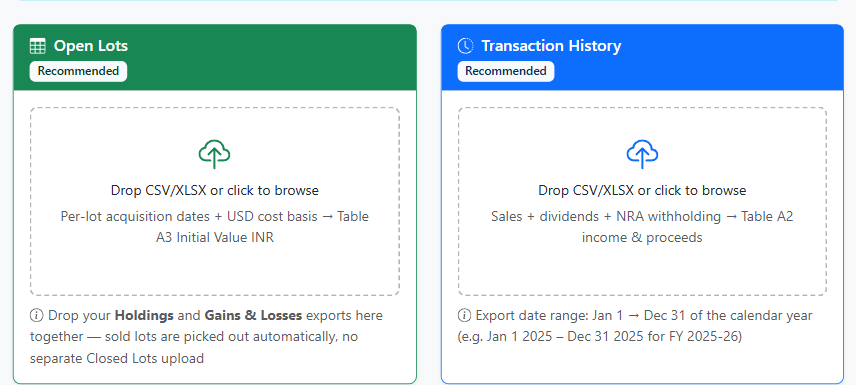
Login to your E*TRADE Stock Plan account at us.etrade.com. Unlike Fidelity or Schwab (three separate exports), E*TRADE needs only two upload slots — one of them takes two files together.
.xlsx with no CSV option. ITRFA.in reads the Excel file directly — upload it exactly as downloaded.
Gains & Losses (only if you sold shares): Stock Plan account → My Account → Gains & Losses → Download Expanded. Acquisition date, sale date, proceeds, and cost basis for every lot you sold.
Check the date-range selector on that screen before downloading. Gains & Losses has its own period picker, separate from the Transactions export below, and it does not default to the full year — only filing Schedule FA? Jan 1 – Dec 31 is enough. Also filing Schedule CG, OS/FSI, or Form 67? Set it to Jan 1 2025 – Mar 31 2026 (15 months) instead, so sales from Jan–Mar 2026 aren't silently dropped. If the picker caps shorter, download it twice and upload both.
Upload both files together in the Open Lots slot — ITRFA.in tells open lots and sold lots apart automatically (the Gains & Losses file's
Record Type column marks each row Sell). If you never sold, skip the Gains & Losses file.Used for: Table A3 initial value INR (cost basis × SBI TTBR on acquisition date, per CBDT's Schedule FA filing instructions — see the free TTBR lookup). Which value goes in which column: Table A2 vs A3 guide.
Date range: January 1 → December 31 of the calendar year
(e.g., Jan 1 2025 – Dec 31 2025 for FY 2025-26 — Schedule FA reports the calendar year ending Dec 31)
Contains: dividends, sale proceeds, tax withholding.
Used for: Table A2 gross income (dividends), gross proceeds (sales), tax withholding for DTAA cross-check.
Only filing Schedule FA? Jan 1 – Dec 31 is enough. Also filing Schedule CG, OS/FSI, or claiming foreign tax credit on Form 67? Those run on India's financial year (Apr–Mar), not the calendar year — export 15 months instead, Jan 1 2025 – Mar 31 2026, so dividends, sales and withholding from Jan–Mar 2026 aren't missed. If your broker's date picker caps at 12 months, export twice — the app accepts multiple Transaction History files, just select both when uploading.
Stock Plan at Work accounts often don't have Activity → Transactions. If yours doesn't, get your Client Statement PDF instead:
Path: At Work → Tax Information → Statements → select account → Document Type: Statement → Time Frame: the calendar year (e.g. 2025) → Apply → Download Single Account Statement
On the upload form, click "Don't have this export? Upload your Client Statement PDF instead" on the Transaction History card — dividends, proceeds and NRA withholding are extracted automatically, each converted at its own transaction date's SBI TTBR rate.
Every PDF is read twice independently and cross-checked before a number is shown — if the two readings disagree, that field is left blank with a note to enter it yourself rather than risk a wrong figure. Fields marked "Auto-filled from your Client Statement PDF" passed this check; still compare them against your own statement before finalizing.
3. Table A2 — Foreign Custodial Account
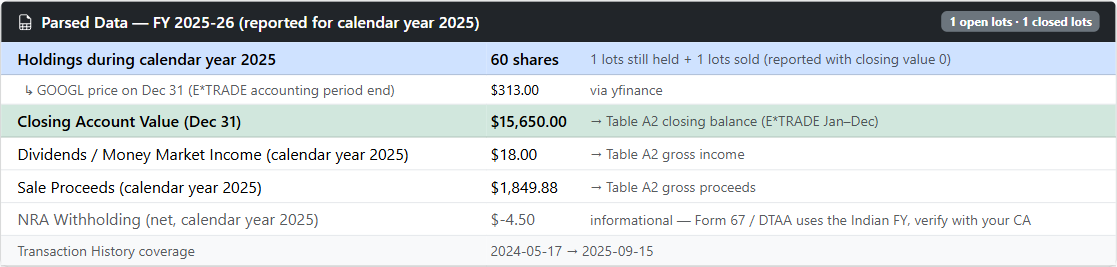
Table A2 covers the E*TRADE account itself (the brokerage wrapper). One row per account.
| Field | What to Enter | Source |
|---|---|---|
| Country Name and Code | 2-UNITED STATES OF AMERICA (dropdown selection, not a typed code) | Fixed |
| Name of Institution | E*TRADE Securities LLC | Fixed |
| Account Number | Your E*TRADE account/participant number | E*TRADE statement |
| Status | Owner, Beneficial Owner, or Beneficiary — your relationship to the account (there's no "Active/Inactive" option) | Fixed — usually Beneficial Owner |
| Peak Balance (INR) | Max(shares × stock price) across the calendar year (Jan–Dec) × SBI TTBR on that peak date | yfinance + SBI TTBR (peak date) |
| Closing Balance (INR) | Shares × stock price on Dec 31 × SBI TTBR Dec 31 | yfinance + SBI TTBR (exact date) |
| Nature of Amount + Amount | One dropdown value (Dividend/Interest/Proceeds from Sale/Other) + its own amount, per row | Transactions export |
4. Table A3 — Foreign Equity Interest
Table A3 requires one row per lot (acquisition date) for every foreign equity interest — one row per RSU vest lot and one row per ESPP purchase lot.
| Field | RSU Vested Lot | ESPP Purchased Lot |
|---|---|---|
| Entity Name | Company name (e.g. Alphabet Inc) | Company name |
| Nature of Entity | Equity shares — N shares acquired DD/MM/YYYY | ESPP shares — N shares purchased DD/MM/YYYY |
| Date of Acquiring | Vest date | ESPP purchase date |
| Initial Value (INR) | Adjusted Cost Basis (FMV at vest) × SBI TTBR vest date — not the $0.00 Acquisition Cost column | FMV on purchase date × shares × SBI TTBR purchase date |
| Peak Value (INR) | Lot's share of max portfolio value during the calendar year × SBI TTBR on that peak date | Same |
| Closing Value (INR) | Shares × Dec 31 price × SBI TTBR Dec 31 | Shares × Dec 31 price × SBI TTBR Dec 31 |
| Total Income (INR) | 0, unless a dividend can be matched to this specific holding — then it goes here instead of only in Table A2 | Same |
If you have 15 RSU vest lots across 3 grant years, you need 15 rows in Table A3. This is why manual filing is so tedious — ITRFA.in generates all rows automatically from the Holdings and Gains & Losses files.
For unvested RSUs: also disclose in Table A3 as beneficial interest. Initial value = 0 (you haven't received them yet). Closing value = unvested units × Dec 31 stock price × SBI TTBR. See full RSU guide →
5. Table F — E*TRADE Participant Trust
Employer stock plans on E*TRADE typically operate a stock plan services trust to hold unvested RSU and ESPP shares on your behalf before they vest. As a plan participant, you have a beneficial interest in this trust — which technically makes it a foreign trust disclosable in Table F.
In practice, many CAs omit Table F on the grounds that the beneficial interest is already captured in Table A3. However, a conservative filing includes Table F. Fields required:
- Trust Name: E*TRADE Securities LLC Participant Trust
- Country: UNITED STATES OF AMERICA
- Settlor / Employer: Your employer name and address
- Date of creation: Your first RSU grant date (approximate)
- Beneficiary details: Beneficial interest as plan participant
6. Common mistakes — including the $0 cost basis trap
-
Using Acquisition Cost instead of Adjusted Cost Basis for RSU sales.
E*TRADE's Gains & Losses export shows
$0.00in the Acquisition Cost column for RSU sales — you paid nothing for the shares. The real basis is in the Adjusted Cost Basis column, which reflects the FMV your employer already taxed at vest. Reporting $0 initial value in Table A3 understates it and is incorrect. - Using March 31 as closing date instead of Dec 31. The ITR field "closing balance as of last date of accounting period" must use Dec 31 stock price and Dec 31 SBI TTBR rate — not March 31 — for an E*TRADE account.
- Using Income-tax Rule 115's preceding-month rate instead of the correct exact-date rule for Schedule FA. Schedule FA values must use CBDT's Schedule FA filing instructions: SBI TTBR on the exact acquisition/event date. Using the wrong rule can cause a 15–20% difference in INR values. See Rule 115 guide →
- Missing the Holdings file because Gains & Losses "already has the numbers." Gains & Losses only covers sold lots. Shares you still hold live in the separate Holdings (By Status) export — without it, Table A3 has no row for your unsold RSU/ESPP shares.
- Manually converting the .xlsx export to CSV. Not wrong, just unnecessary — ITRFA.in accepts the Excel file as downloaded. Converting it yourself is extra work that changes nothing.
7. E*TRADE vs Fidelity vs Schwab — what's different
The Schedule FA rules are identical regardless of broker — CBDT's exact-date SBI TTBR rule, the Dec 31 closing date, and the per-lot Table A3 requirement all apply the same way. What changes is only the export mechanics:
| Fidelity NetBenefits | Charles Schwab | E*TRADE | |
|---|---|---|---|
| Open lots export | View Share Details → Open Lots | Positions → Lot Details (per symbol) | Holdings → By Status → Download Expanded |
| Closed lots export | View Share Details → Closed Lots | Realized Gain/Loss | My Account → Gains & Losses (same file also covers open lots) |
| Transactions export | Activity → Transaction History | Transaction History / Equity Award Center | Activity → Transactions |
| File format | CSV | CSV | .xlsx (uploads directly, no conversion) |
| RSU cost-basis gotcha | — | — | Acquisition Cost shows $0 — use Adjusted Cost Basis |
| Table A2 institution | Fidelity Investments (NetBenefits) | Charles Schwab & Co., Inc. | E*TRADE Securities LLC |
If your employer switched stock plan administrators mid-year, you may need one Table A2 row per broker for the year of transition, and Table A3 rows sourced from both exports.
8. Automate with ITRFA.in
Manual filing from E*TRADE data involves:
- Downloading Holdings, Gains & Losses, and Transactions from your E*TRADE Stock Plan account
- Correcting the Acquisition Cost vs Adjusted Cost Basis mix-up on every RSU sale
- Looking up SBI TTBR rates for every acquisition date (can be 10–20 dates)
- Looking up stock prices for every month-end to find peak balance
- Computing INR values for every lot and entering 15–30 rows into ITR-2
ITRFA.in does all of this from your file upload — select E*TRADE as your broker, drop your Holdings + Gains & Losses files (as downloaded, no conversion) into the Open Lots slot plus your Transactions export, verify the auto-fetched exchange rates on the review screen, and download ITR-ready JSON + Excel in under 2 minutes.

Upload E*TRADE Holdings, Gains & Losses, and Transactions files → get Table A2, A3, F with correct SBI TTBR rates. Takes 2 minutes. ₹399 for full INR values + JSON + Excel download.
Convert E*TRADE files to Schedule FA →